Hey everyone!
I hope you all had a great Thanksgiving! We did for sure! I am always trying to think of thrifty, unique and thoughtful gifts to make my family and friends each year. I love making custom pieces that they wouldn’t receive from anyone else. This year I decided to make my niece and nephew name signs for their room. I decided that this would be our teacher gifts this year as well, only I will use their last names!
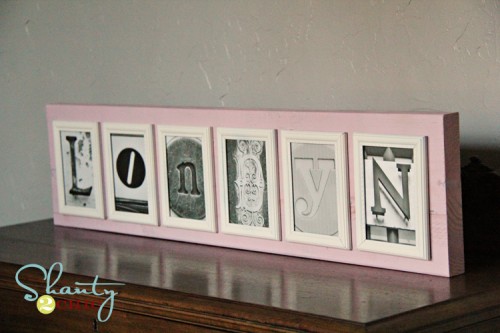
Today I am showing you the sign I made my for niece Londyn.
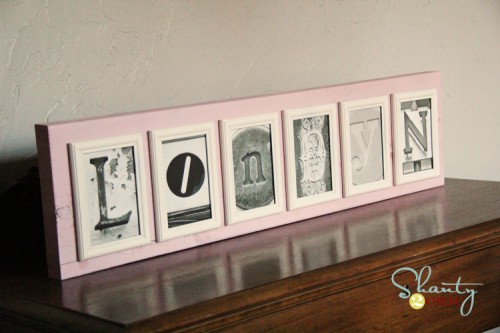
I found a GREAT flickr photo site on Pinterest. It is an amazing source for letter photos. There are literally hundreds of each letter. You can see that site HERE! You simply download for FREE and print from your own printer… Pretty darn cheap and easy! I found her letters and got started on the rest.
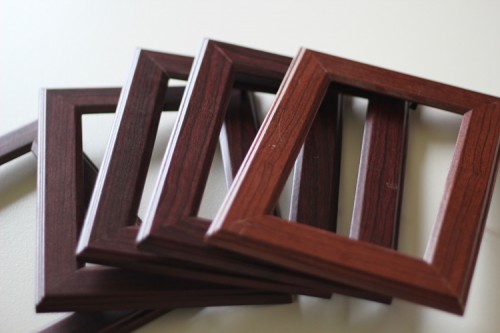
I bought 6 4×6 frames at the Dollar Tree for a buck a piece.
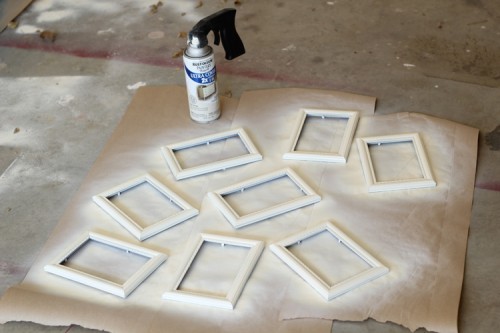
I removed all the plastic and glass from the frames like this…
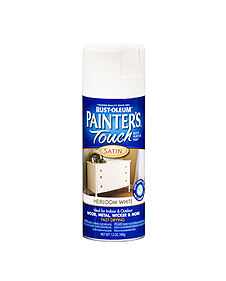
I gave them all a coat of my very favorite…
You can get it at Home Depot.
I used Heirloom White for the frames…
While those were drying, I started on my wood.
I used a 2×10 for my sign. This is heavy and will sit alone on a table without support. If you are wanting to hang yours on a wall, you could also use a 1×10.
I paid $4.50 for an 8ft board and made 2 signs from it.
I cut a 36″ piece and painted it Sweet Pea.
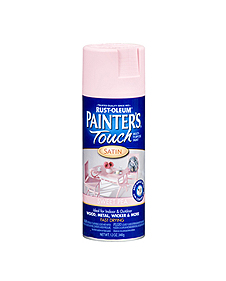
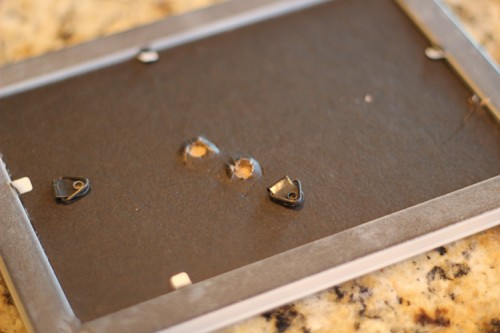
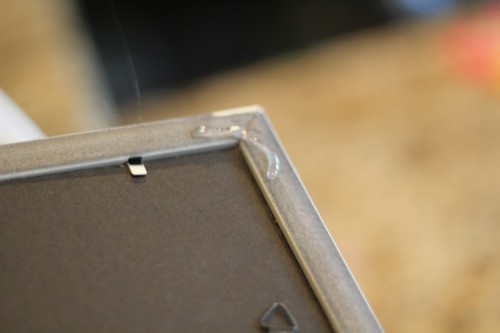
While that was drying I finished up my frames. I added the glass back into each frame and also added my new FREE letter photos. Once I attached the back I gently pulled the support piece off the back of each frame. That was quite easy to do on dollar store frames
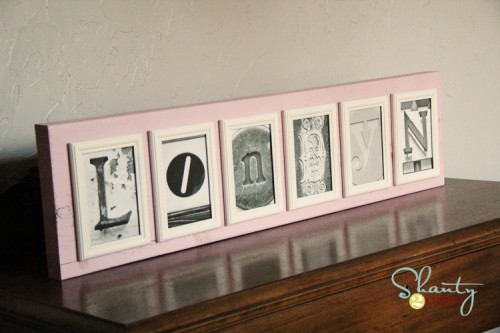
Then, I added a bit of hot glue to the corners of each frame and attached them to my new pink board.
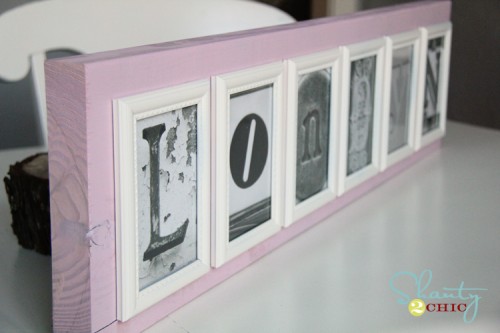
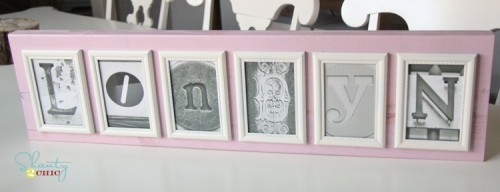
The result…
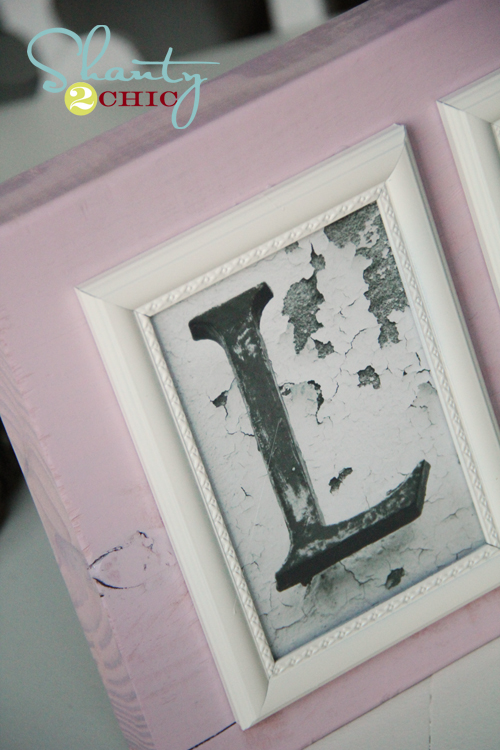
What do you think?
I am so excited to also make these for the kiddos teachers. I am planning on staining the boards and going with a neutral frame color so they can use them anywhere.
If you are making a longer name, I would suggest going with 3×5 frames and using a 2×6 or a 2×8 as your board.
And now let’s do the math… I paid $6 for the frames, $2.50 per sign for the wood, and the pictures were free. That’s about $10 a sign if you count the spray paint… My kind of gift!
Thanks so much for stopping by! Let me know if you have any questions!
~Whitney
Pin It


Whitney! I LOVE it!!! Now my brain and color schemes are going CRAZY!!!! Thanks for posting!
Hey girl! YEAH! Glad you like it… Super cheap and fun!
Would live to know where I can get the free photos
I am interested in doing this for my kids. Can you tell where to get the pictrures of the letters? Thanks
There is a link at the top of the page. Click on the word here
Girl it looks awesome! What an awesome idea!!!!!!
Thanks so much Latoya!
I can’t even tell you how much I love you right now!!! Yay Yay Yay for an excellent christmas gift idea!!!!! I have always wanted to make some of those pictures but the idea of finding and photographing all of those shapes overwhelmed me! Thanks so much for finding them for free!!! I don’t know how I could ever thank you, so I will just pin and tweet the heck out of this post and hope that will suffice!
Um yes… That will totally suffice
Thanks!
Oh, I really love this! What a fabulous idea! And the color is so pretty! Love the name, by the way!
I’ve been wondering where to find the free letter photos- thanks SO much for the link. Cute, cute project…wonder if I can find time to make some of my own……
This is absolutely awesome!!!!! Thanks for the link and the idea!
Thanks Shirley and you’re welcome
Thanks so much for the link! I have a question about saving the image. (I am a Flickr newbie). When I right click on the picture, it tells me that it has “some rights reserved”. What is the best way to save it? Do I have to email each one to myself?
I click on the picture and then click ‘view all sizes’ in the top right. It opens a screen where it allows you to download any size. Don’t worry… It took me a LONG time to learn this myself several months ago! It’s confusing!
Let me know if you have any other questions!
This may be a dumb question, but I have tried and tried to rotate them from printing horizontal to vertical and it’s just not working…any tips??
I am having the same problem, my husband is about to pull his hair out trying to figure this out for me
Any advice would be welcome!!
I was having the same problem at first, but then I realized that if you rotate the picture when you download it (and it comes up in the picture viewing program), then print it, it does print it normal and it is not cut off. And then you can change if you want the whole page or whatever size you want and it does print it normal.
I click on the sizes, but no matter which size I choose it still prints a really big picture of the letter. How did you them to print smaller?
Thank you! This is an amazing project and I have already been out to pick up my supplies!
When you printed your letters, what size did you select for the 4X6 frames?
Looks like the options are Medium 500 • Medium 640 • Large • Original
I am also wondering which size is best for 4 x 6 frames? Thank you, I LOVE this idea! So cute!
I am wondering the same thing… Please help!
Did you ever get the info on how to resize for 4/6 photo. No matter what size I download it cuts off top and bottom. Help!!!!
I download the full size photo. I then open it in my photo editing program and crop it to 4×6. Then send it to your printer. You have to crop the photos.
I love your idea and would love to try them over Christmas Break. I am having trouble printing the letters in a 5 by 7 size. Any specific ideas?
I absolutely LOVE your sign! Thanks so much for sharing this! I had found the flickr letters earlier in the year and then when I went back to look at them again couldn’t remember where I saw them. I’m so exctited to use the free images to make some signs for gifts, thanks again!
Thanks so much Janet
I love this idea! But I am having troubles trying to “pin” a letter or save it, any ideas what I am doing wrong??? Thanks!
Are you trying to download it on Flickr? This is how… I click on the picture and then click ‘view all sizes’ in the top right. It opens a screen where it allows you to download any size.
Don’t know if its just my computer or what. When I’m on Flickr and I want to print a letter its printing them landscape instead of portrait. Is that bc of the letter style I have chosen? So new to pinterest and flickr.
u guys seriously ROCK!! I have been wanting to make something similar to this for my sons new tween “industrial” bedroom and now I can for not a lot of money. THANK YOU CREATIVE GIRLIES!!!!!! You guys never let me down
Aww thank you Liz!! I appreciate your sweet comment! Send a pic when you get it finished!!
This is awesome!!! I’m not kidding I recently spent $60 for something like this for my sister as a bridal shower gift! I cannot wait to make these on my own for so much less!!
I know it… I have seen some similar for a ton of money. This is much cheaper and fun to make!
Whitney, loving this gift. I’m sure it will be a big hit. I need to get one of these for the girls and Adler.
Thanks so much Debbie
Thank you for the link to the site and for the idea! I like the choice of gray scale images that you have done for your sign – very nice color combination.
I am glad you gave the link to download the letters – I have been searching images like that to make a journal for my husband. Thanks to you I now can stop searching and get my hands busy.
Thank you, thank you, thank you!
Yeah Laura! Good luck with that and thank you for your sweet message
How did you change the color of your picture when you printed it?
I just changed them to black and white on my photo editing program. Most free programs will do that for you
I love this!!!!
Love,Love Love it!!!! Thanks for the great idea. Can’t wait to do mine this week-end!!!!
love this idea!!!!!! i am clueless when it comes to flickr so i don’t know which photos i am allowed to download. any guidance/ideas??
Did you use photo paper and what size of the picture did you print off of the Flickr site to fit in the 4×6 frame.
Love this, Shanty girls! Sooo stinkin cute!! Genius! xoxo
This is fantastic. I recently saw these selling on a website and I fell in love with them until i saw the price ( $149-179 a peice). I’m so happy I stumbled upon yoour site, thanks!
I’m having trouble getting my letters to print portrait style. When I print a letter out on Flickr it looks right until its printed then it comes out landscape. If I do the sign landscape style it will have to be a bigger sign. Can you tell me how to fix it?
I’m having trouble getting the letters vertical too. Even when i’m changing view to portrait. any ideas?
I downloaded the large or regular file BUT I cropped the pics down to size using my photo editing program. I use PS Elements and iPhoto, but I know Picasa, Kodak and other free programs crop photos as well. Hope this helps!
This is really a cool idea… thanks for posting it, unless I am overlooking it, I do not see the link where I can go to download the free pictures. Could you please share this info again with instructions for printing, I would very much appreciate it.
This is just too cute. I noticed though that the brown frames are not the same as the white ones. The white ones have more detailing on them. Did you end up using different ones?
I made more than one… The brown frames are the ones I used for my nephew.
Love this idea. I missed out on the Free letter photos. Where would I obtain them? Thanks and enjoy your blog!!
Wanting to make several of these but getting so aggrevated bc when I get ready to print a letter I don’t know what size to ask for and when I play around with it the letter isn’t upright for a 3×5 or 4×6 and I would have to go side ways with it. Please help!
I downloaded the regular size file of each picture and then used my photo editing program to crop it to 4×6. Most editing programs will do this. Hope this helps!
Thank you for sharing this! I wanted to do this for a long time, but it is too much money! What program are you using to crop and edit your photos? I just tried and downloaded the one letter, and when I went to print it, it will cut off my letter. The letter photo is up and down, but the print wide and short…what do you think i should do?
Photoshop Elements
I have that program, but do not know how to use it…ugh!
I am so excited to make these for Christmas gifts! Thanks for the GREAT idea!
This is such an amazing idea — I am super low on funds so I’m using it for a wedding gift and making the letters spell their last name. Thanks SO MUCH for posting, this is saving me a ton of money, and let’s me use my creative side
I am having problems cropping the pictures to the 4×6 size. I’ve tried both Windows Photo Gallery and Picnik.com, and both of them are not allowing the entire letter into the 4×6 rectangle. Can you be more specific in how you were able to do this? It’s such a great idea!!
Making this for my sister for Christmas and I repinned it. Yay!!! So excited!!!
What kind of paper did you use and what size did you print to fit the 4×6 frames?? Thanks!!
I downloaded the medium or large size of each print and then resized them, or cropped them using elements. You can use almost any photo editing program to crop. I did look for letter that were a bit smaller because I was having the same issue. Hope this helps!
I am trying to make some signs for Christmas gifts but I cant figure out what size to download to be able to print them as a 3X5 or a 4X6. What size did you download?
I downloaded the medium or large size of each print and then resized them, or cropped them using elements. You can use almost any photo editing program to crop. I did look for letter that were a bit smaller because I was having the same issue. Hope this helps!
Very awesome! I’ve tried to make a family sign like this before just googling shapes that looked like letters and it was such a pain! This helped like crazy! Thank you!
Where did you get the wood? Do you just go to Home Depot and ask them to cut it to size for you?
How do I find letters like these? I just signed up for Flickr but not familiar wtih it at all.
Any help would be appreciated! LOVE YOURS!!!
Awesome idea! I love the thought of having them stand up on the dresser. As a teacher, I would totally love receiving one of these! And, can I just add, that it is so easy to comment on your posts! I wish more people made it this easy, without the special accounts or word verifications. Thanks!
I have been searching for photo fonts for a while now after seeing various retailers offer signs like this. I too am a dollar store junky. Thank you for the inspiration. I can’t wait to make these for our children’s classrooms.
I’ve seen these letter types used 1,000 times, this has to be my favorite.
What a great idea! Thank you sooooo much for sharing – you have solved my ‘what to get people’ dilemma!!
i love this! where did you find your letters for free?
This is an awesome idea!!!! since i want to use 6X4 frames what size did you print the letters out from flickr? theres so many sizes and i cant seem to get the size right.
thanks for sharing your ideas, hayley
Hi what is the site you got the letters from and did you use picture paper? Thanks
please tell me at what website do i find the letters. thank you.
The website is at the top of this page
I love this idea, can you please tell me the site that you use for the letters, i would love to try making 1 ???
What kind of paper did you print the letters on? photo or regular paper?
what is the link that i can download the free images?
This is beautiful! What size letter did you use to fit the 4×6 frames?
Wow! Thankyou, Thankyou!! Just finished printing letters for my first sign.
Found on Pinterest, thanks again for sharing.
Where do you get the free letters? Is there a website that you can share. Love this idea!!!
Can you let me know the link to these, I would love to do a couple gifts!! Thank you so much! And what an awesome idea!!
I was wondering if you could forward the link to the letters for me. I keep looking for it on your site but am apparently missing it somehow. Thanks.
She has it posted at the top of this page. She has highlighted the word HERE in blue letters as well as the words GREAT flickr photo site highlighted in blue at the top of this page…
Its at the top of this page. It says its a flickr site…click here .
Thank you Robin!
Ok….I’m having troubles printing these ;( I’ve read here and am now going to try the viewing the different sizes on flicker….but quick question though, which one of the sizes did you choose to get a 4×6? And id you have to then just trim it down?
I downloaded the large or regular file BUT I cropped the pics down to size using my photo editing program. I use PS Elements and iPhoto, but I know Picasa, Kodak and other free programs crop photos as well. Hope this helps!
On the wood for the sign, do you just ask for a 1 X 10, if you are hanging on the wall, or do you get an 8 ft. piece of lumber and cut it to fit? Was thinking about giving as Christmas gifts, using the word LOVE. Would 5X7 frames be better since it’s a shorter word…or just use a shorter piece of wood?
a 1×10 is not as thick as a 2×10. Either way you will have to cut it because the 2x’s come in 8ft pieces and the 1x’s come in just a few lengths. Home Depot and Lowe’s all cut your wood for you. Hope this helps!
I saw this on Pinterest and love it! I paid a lot of money for the one I have, but these will totally be Christmas gifts! Can’t wait to make them! Where did you get the free picture from?
I really love this idea! You said that you plan on making these as teacher gifts. I am always looking for personalized teacher gift ideas but I cannot figure out how to make this a teacher gift. Share your thoughts? Thanks!!
I’m doing their last names.
I have literally spent hours trying to resize the photos so when I print they don’t cut out part of the picture. I have tried printing on walmart.com, mpix and the computer directly with NO luck. I have photoshop. Would you be so nice to give me the steps on how to do it?
I opened in PS and cropped each picture. I used the 4×6 constrain setting at the top left. Hope this helps!
I love this idea– but am confused about the wood that surrounds the frames. It looks like your must have cut openings for each picture frame into the wood– since there are pink dividers between each white frame.– How did you do that? I need to explain this to my hubby and I’m lost!!
Thanks!
The frames are spaced out on the board about 1/2″ from each other. There is nothing cut to on the board. They are just hot glued down.
I love these!! Can’t wait to make them for the family. I bought a similar one and it was pricey. Thank you so much for the idea and the letter site!
would you share the download link with me? great idea!
Hello! Super cute! I’m new to your site but will be a frequent viewer now
Please share the link for the free letter photos.
thank you so much!
LOVE this!!! Wonderful job, can I get the site where you found the letters?! Thanks!!
LOVE LOVE LOVE this. Can’t seem to find the link to the website with the letters though. ?
Awesome idea ! YOu can even put a favouite black & white of the person either at the front or at the end of the picture. Or do a couple’s last name and then a pic of the two of them togehter. OMG ! ! ! I just got the BEST idea for my parent’s 40th anniversary ! ! ! I’ll put their wedding picture at the front, then the last name, and then a picture of them now at the end . .Oh thank you, thank you . . .I’m so excited now ! ! ! !
What type of wood do I ask for when I go to home depot and get it? I am only doing a 3 letter name.
They are called 2×10 and they are pine. You can have them cut it there for you
I have a questin can i put these letter on scrapbook paper? or kodak paper? can you change the size? I am so lovin this site!!!
What a wonderful idea! I’m thinking about making one of these for my living room. Thanks for the inspiration!
Love the work! Please share the link for letters. Thanks so much.
I chose some letters and sent them to be printed. When I picked them up, the letter was cropped. So, I came back to the site and turned them because I wanted them to be like they are in your picture. However, when I sent them to the site I wanted to print them for me to pick them up, it looked like they were going to be cropped again and the whole letter would not be showing. Any ideas? Yours looks perfect!!! I really want to do this for Christmas.
Where do I find the free photos to download?
This is amazing! How do you download the photos from flickr for free??
How do I print the letters so that I may frame them? Maybe I am missing something, but I can’t seem to get them printed. Thanks
Ok, maybe I am just not getting this but do I need a Flickr account in order to download the photos? Do I need a photo editing program to be able to crop and size the pics once I choose them? Also, is there anything else I need to know so that I can begin to make these awesome gifts? I tried right clicking on a photo but it gave me no options such as saving or printing. Thanks for any help.
This is adorable! I have been having a hard time finding a frame to fit 6 4×6 pictures. This is the perfect solution!
What a great idea! The same basic project could be altered so many different ways depending on the images used and the colors. I love it!
Love this! I made one for each of my coworkers and they LOVED them!! Thanks for sharing your creation and ideas! I used the free program GIMP to edit them down to 4×6 pictures and it worked out perfectly! Thanks again for posting!
I made this for Christmas…with a black board on the back…and I loved it!! I made 2 of them…thanks so much for a great tutorial!
I gave you a shout-out here: http://christinasadventures.com/2011/12/what-i-made-gave-for-christmas.html
Your Letter Photo Art is AWESOME! I’m excited to blog with you in 2012!!! I’m hosting a party and would LOVE for you to link up!!! XO, Aimee
Overflowing with Creativity
I made these! I gave them as Christmas gifts and my family loved them. You can see them on my FB page here: https://www.facebook.com/photo.php?fbid=273736012682549&set=a.110870812302404.9316.110657852323700&type=1&theater¬if_t=like
Thank you so much for the great idea!
I have 4 weddings to go to within the next 6 months, and am just about finished creating “last name boards” to use as gifts for each one! Thank you so much for sharing this idea and for such detailed instructions (coming from a detail person)! Great project!
I am not able to get the letters to print 4 x 6. Any ideas on what to do before I keep wasting more ink and paper?
Ok…so I was a bit of a smararse in my last post, so to make up for it…I’ll post detailed instructions of…
HOW TO PRINT THE 4X6 LETTERS (PC not Mac):
The default seems to be Large, and I’ve just been leaving it on that one.
1) The website for the letters (per this blog) is at: http://www.flickr.com/photos/lwr/collections/72157594587080023/
2) Click on the letter group that you would like to use. (ie: Letter S or Letter C, etc)
3) When you’ve see the perfect letter from the small thumbnails, click on it.
4) If you think you want to use it, move on to #5, if not, go back an choose a different letter.
5) Click on the picture again…it will open on a new screen that will be surrounded by all black.
6) At the top right of the page, click on VIEW ALL SIZES.
7) You’ll see all different sizes: Square, Thumbnail, Small, Medium 500, Medium 640, Large, Original.
9) Right Click on the photo and click on Save Picture As…
10) Up at the Top, Click on the drop down box next to Save In and choose Desktop. (To make this easy…if you know what you’re doing, you can save where ever you want.)
11) Next to File Name at the bottom, enter a file name…ie: Letter S, etc. and then click Save.
12) The file should now ben on your desktop…make sure that it’s there.
13) Right Click on that file and click on Open With…and choose Microsoft Picture Manager.
14) That letter should now be open.
15) Choose Edit Pictures… from the formatting menu bar. You should now see a new menu bar on the right side.
16) Choose “Crop” under the EDIT USING THESE TOOLS,
17) Under CROP SETTINGS change the Aspect ratio from None (default) to 4×6.
18) The Crop box will be in Landscape, but change it to Portrait under CROP SETTINGS. You’ll be able to see what the picture will look like as a 4×6. If the picture won’t fit in that 4×6 box, or you don’t like the crop you might want to choose a different letter because there won’t be a way to get the exact same measurements due to the original crop.
19) If you’re happy with the way it looks (you can move the box by clicking and moving it around), click OK on the right under PICTURE DIMENSIONS.
TO MAKE BLACK AND WHITE (SKIP AND GO TO #22 IF YOU DON’T WANT BLACK AND WHITE)
20) Now click on Edit Pictures (at top) again and this time choose “Color” under EDIT USING THESE TOOLS
21) On the Saturation slider, move the slide all the way to the LEFT.
22) Click on “File” and “Save” (or “Save As” if you don’t want to save over the original picture) and you’re done.
NOW IT SHOULD PRINT PERFECTLY AS A 4X6!!!
Kathy youre awesome!! I couldnt figure out how to save them!!!!
Nevermind the question I posted earlier. lol. I JUST saw this and think I have it under control now. haha. By the way, great idea! I hope mine turns out as good as yours did. =)
WOW! Thank you! I’m going to create a dry erase board with the letters in the frames … oh my gosh … is Dollartree open? Tee hee!
Did you use regular print paper or picture paper to print these on?
I absolutely adore this idea and plan to make this as gifts!!! An easy way to scale down photos would be to save the image, and have them printed @ Walgreens in a 4×6 print – then they’re glossy, and save ink! Walgreens always has special discounts for photos and you can get them cheap!
also! Walgreens photo editor has an option to change it to black and white – this way, all of your photos will have the same level of saturation!
YAY!! I figured it out, how to crop it to fit the frame! This project is just simply beautiful, thank you for sharing it!! Keep em’ coming!!
Did you use two different styles of frames? The first few images, of the Dollar Store frames, are of plain frames with no decorative detail… But the final board features frames with a sweet little decorative detail around the pictures – were both styles of frames from the Dollar Store? Either way they look great, I was just wondering…
I made more than one. The steps were from another board.
Love this idea – I have been eyeballing the expensive versions of this for years! Thank you
Probably a dumb question… but where did you get the wood for this project? Home depot, Lowes? Do they cut it down to size for you?
This is genius, thank you for sharing!
Hi there! What size letter did you print to fit in the 4’6 frame? I’m on the website to print the letters now and I can’t figure out what size I need. =/ lol. Thanks in advance. =)
I found you on Pinterest. Thank you for sharing, I have been wanting to have something like this, now with the FREE printable letters, I can!
Can I have the link for the printable letters, also? Please! This will definitely make awesome teacher gifts!
I am needing some help. 1) What kind of paper did you use, photo paper? 2) What do i put on the back of the board if we are going to be hanging this on the wall? Thank you so much, LOVE this idea!!
Yes…use photo paper
To hang, go to Wal-Mart or Home Depot and buy a picture hanging kit. They’re easy to find!
Why oh why are people asking the SAME questions over and OVER again!!!
The link for the printable letters is in the 4th paragraph of her BLOG POST! It says “You can see that site HERE!”. It’s not rocket science people!!!
AND she’s so nicely said REPEATEDLY that you have to print them AFTER croping from a photo program like Photoshop or PS Elements. You CAN’T print from Flicker in the 4×6 size that you need!
THANK YOU KATHY!!!!!!!!!!!
LOL! I guess some people were just too excited and just didn’t bother to read! :O)